
Requirements: 2.3 and up
Overview: The Talker app offers a smart way for you to interact with your phone. It works by creating rules which, when triggered, make the phone talk and let you reply back as needed.
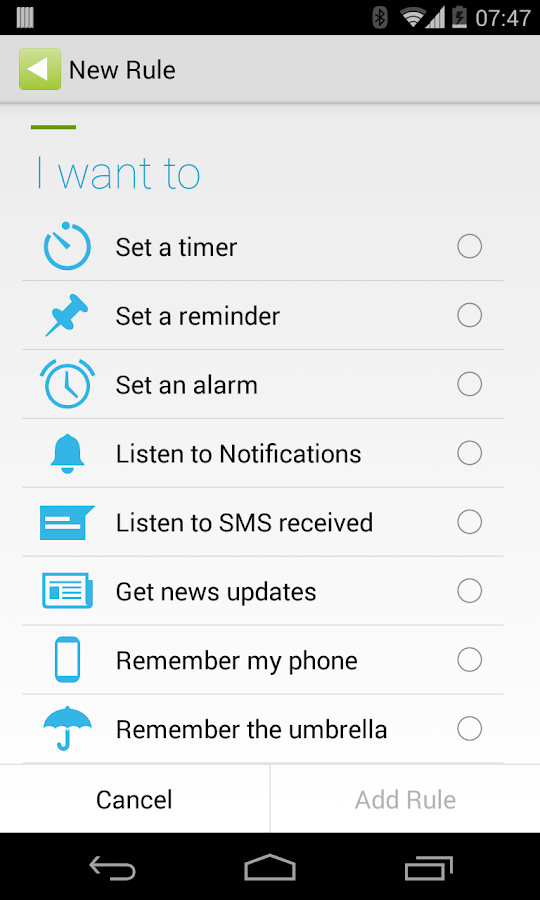
You can setup alarms and reminders, listen to news headlines, receive text messages and let the phone warn you when you are about to leave it behind.
Please consider writing to us before leaving a review: info@thetalkerapp.com. We will be happy to work with you to add new features or fix any issue you might have.
Main Features:
* Listen to reminders: No need to check your phone for the time anymore. Just set the time and let your phone speak to you when the food is ready
* An alarm that talks: Set up your alarm like you normally would. Once you disable it, Talker can let you know about the weather or your appointments of the day
* Text message (SMS) on the go: Listen to your SMS contents. Get text delivered to your headset when you can't reach your phone
* Get news updates: Talker can grab your favorite news so you can listen to its headlines
* Always take your phone with you: Talker can warn you when you are about to leave the phone behind
* Remember the umbrella: Get weather reminders that match weather conditions
* Something random just for fun: Get bits of text automatically generated for your amusement
In addition, Talker supports bluetooth devices and can detect the language of messages received. Supports English, French, German, Italian, Portuguese and Spanish messages
-----------------------------------------------
Please Note:
* The free version only allows you to have one active rule at a time. You can add as many rules as you want but you need to disable the active rule first. Please consider buying the pro key to remove this limit.
* Bluetooth support is experimental. Please let us of any problem so we can fix it together.
* The talk back option works only with English for now. Support for other languages coming soon.
* Talker relies on your phone's Text-to-Speech engine to talk. You can improve your experience with the app by installing a third-party engine. Visit our website to find out more at: http://www.thetalkerapp.com/improve-...xperience.html
-----------------------------------------------
About the permissions:
* Read phone status and identity: Needed only to detect whether you are on the phone to prevent Talker from talking at the same time
* Receive text messages (SMS): Needed to speak the contents of the SMS received
* Send text messages (SMS): Needed so that you can choose to reply back when a message arrives. We only send messages with your explicit consent
* Read and Write messages (SMS): Needed to save sent messages to your inbox
* Read your contacts: Needed to let you know the sender of the SMS message
* Record audio: Needed to detect ambient noise and automatically adjust the volume
* Approximate and precise locations: Needed to give you weather updates based on your current location and trigger rules based on your home or work address
* Read calendar events plus confidential information: Needed to read your calendar entries and time. We only access and read your entries' time and title
* Full network access: Needed to get weather updates and news information. We do not share any information with third-parties nor use ads which do so
* Run at startup: Needed to reschedule your rules when you restart your phone
* Control vibration: Needed for the alarm to vibrate the phone
* Prevent phone from sleeping: Needed for Talker to speak when you are not using the phone. Battery consumption is kept to a minimum
* Change your audio settings: Needed to find out whether your headset is plugged in or not. We do not modify your audio settings
* Pair with bluetooth devices and send sticky broadcast: Needed to work with your bluetooth device. You can setup rules that are only triggered if your bluetooth headset is connected, for example.
What's New
Version 1.2
* Create rules to speak your phone's notifications. Optimized for Whatsapp, Google Hangouts, Gmail, and Google Calendar (Works only with Android versions 4.3 and above)
* Set timers and recurring reminders
* Set rules to be triggered when the screen is off or at certain time intervals
* Add a custom message to your alarms
* Bug fixes and performance improvements
This app has NO advertisements
More Info:
Code:
https://play.google.com/store/apps/details?id=com.thetalkerapp.mainDownload Instructions: Pro features are unlocked!!
Mirror:

Talker Smart Notifications Pro v1.2 apk

.jpg)
.jpg)

