Nandroid Manager Pro v2.2.2 apk

Nandroid Manager Pro v2.2.2

Requirements: 2.0 and up

Overview: So what is Nandroid Manager? Well Nandroid Manager is the ultimate tool for managing all of your nandroid backups!
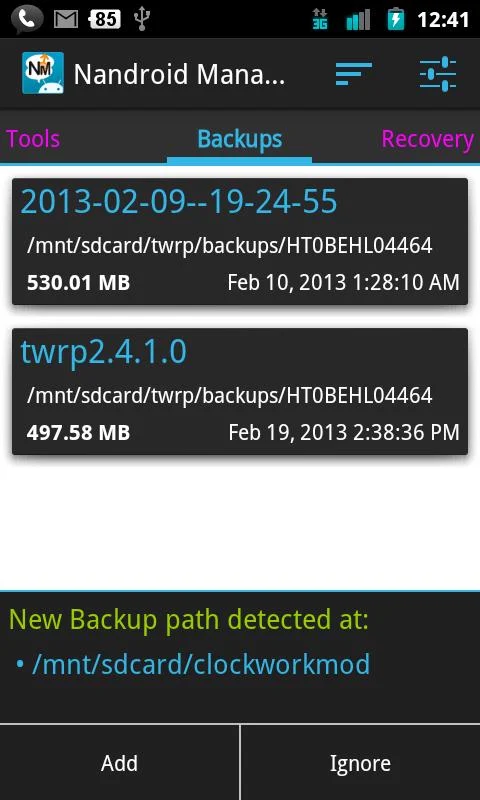
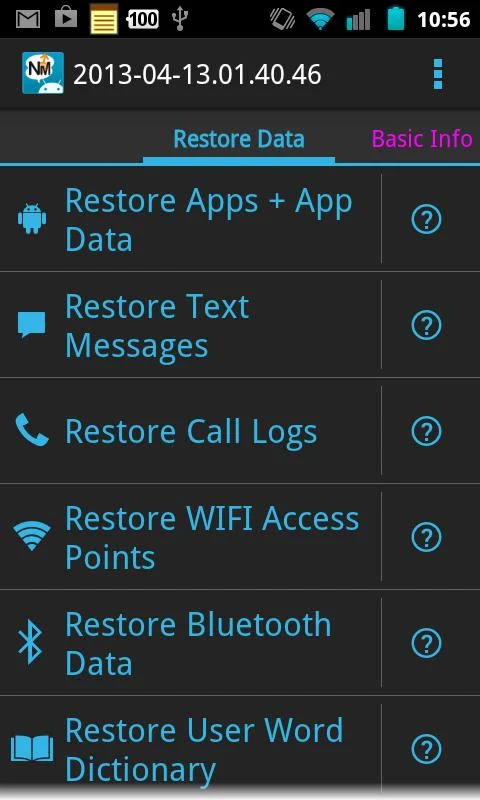
With Nandroid Manager you can restore data from your nandroid such as apps+data, text messages, call logs, and much more!

Also with Nandroid Manager not only can you restore data from your nandroid backups but you can also flash new recoveries and use tools like fix permissions.

Nandroid Manager currently supports nandroid backups created by TWRP and Clockworkmod (v5.xx and v6.xx) based recoveries!

THIS APP REQUIRES THAT YOUR DEVICE IS ROOTED AND YOU HAVE BUSYBOX INSTALLED!

Current Features:

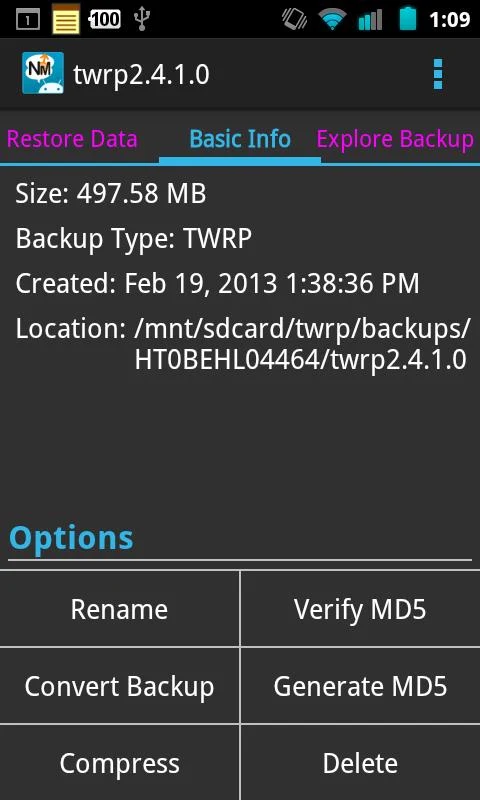
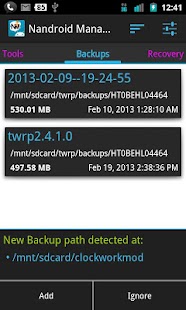
* View basic info about your nandroid backups.

* Explore contents of nandroid backup.

* Extract files from nandroid backups.

* Support for yaffs2.

* Rename backup.

* Compress backup to zip.

* Delete backup.

* Verify and regenerate MD5 hashes for backups.

* Restore Apps+Data from backup.

* Restore Text Messages from backup.

* Restore Call Logs from backup.

* Restore WiFi Access Points from backup (Pro).

* Restore Bluetooth Data from backup (Pro).

* Restore User Word Dictionary from backup (Pro).

* Restore Browser Data from backup (Pro).

* Restore Nandroid Backup.

* Flash new recovery.

* Fix permissions tool.

Many more features to come in the future!

Planned Features:

* Convert backups between TWRP and CWM.

* Export data from nandroid backup so it can be restored on other devices.

* Restore Home screen data such as wallpaper, launcher, shortcuts, and widgets!

Support thread for this app: http://forum.xda-developers.com/show....php?t=2044414

Known Issues: https://docs.google.com/document/d/1wUb ... sp=sharing

Todo List: https://docs.google.com/document/d/1ncj ... sp=sharing

Important info about restoring sms data:

There is a settings in the default Messaging app that deletes older messages from conversations which have more than 200 messages. When restoring1000s of messages this setting can cause a lot of problems because it keeps trying to delete messages when you try to open the conversation. If you are restoring lots of messages, then disable this setting by opening the Preferences of the Messaging app. On some devices it can take a long time to index the new message data. If you get a blank screen or if the phone asks you to “Force Close” or “Wait” when opening the messaging app just press “Wait” and leave the Messaging app running for a while. It will eventually finish and the app will become usable again.

What's New

Version 2.2.2

* Now using PagerTabStrip instead of ViewPagerIndicator to reduce size of app.

* Explore text messages now shows contact's name based on contacts on your device.

* Added link in setting for people to help translate the app.

* Export thread in explore text messages now uses recipients name instead of number.

* Fixed various FC's and bugs.

* Improved how call logs are displayed.

Release info:

Unlocked Pro features in Nandroid Manager!

This app has NO advertisements

More Info:

Code:


https://play.google.com/store/apps/details?id=com.h3r3t1c.bkrestore


Download Instructions:

http://www.kingfiles.net/si1epwteyzx...ager_2.2.2.apk

Mirror:

http://www.tusfiles.net/gxw8489kntva

http://ul.to/afnel7bc

http://rg.to/file/7a2b37b5398a8d0d3e...2.2.2.apk.html


Nandroid Manager Pro v2.2.2 apk
Nandroid Manager Pro v2.2.1 apk

Nandroid Manager Pro v2.2.1

Requirements: 2.0 and up

Overview: So what is Nandroid Manager? Well Nandroid Manager is the ultimate tool for managing all of your nandroid backups!

With Nandroid Manager you can restore data from your nandroid such as apps+data, text messages, call logs, and much more!

Also with Nandroid Manager not only can you restore data from your nandroid backups but you can also flash new recoveries and use tools like fix permissions.

Nandroid Manager currently supports nandroid backups created by TWRP and Clockworkmod (v5.xx and v6.xx) based recoveries!

THIS APP REQUIRES THAT YOUR DEVICE IS ROOTED AND YOU HAVE BUSYBOX INSTALLED!

Current Features:

* View basic info about your nandroid backups.

* Explore contents of nandroid backup.

* Extract files from nandroid backups.

* Support for yaffs2.

* Rename backup.

* Compress backup to zip.

* Delete backup.

* Verify and regenerate MD5 hashes for backups.

* Restore Apps+Data from backup.

* Restore Text Messages from backup.

* Restore Call Logs from backup.

* Restore WiFi Access Points from backup (Pro).

* Restore Bluetooth Data from backup (Pro).

* Restore User Word Dictionary from backup (Pro).

* Restore Browser Data from backup (Pro).

* Restore Nandroid Backup.

* Flash new recovery.

* Fix permissions tool.

Many more features to come in the future!

Planned Features:

* Convert backups between TWRP and CWM.

* Export data from nandroid backup so it can be restored on other devices.

* Restore Home screen data such as wallpaper, launcher, shortcuts, and widgets!

Support thread for this app: http://forum.xda-developers.com/show....php?t=2044414

Known Issues: https://docs.google.com/document/d/1wUb ... sp=sharing

Todo List: https://docs.google.com/document/d/1ncj ... sp=sharing

Important info about restoring sms data:

There is a settings in the default Messaging app that deletes older messages from conversations which have more than 200 messages. When restoring1000s of messages this setting can cause a lot of problems because it keeps trying to delete messages when you try to open the conversation. If you are restoring lots of messages, then disable this setting by opening the Preferences of the Messaging app. On some devices it can take a long time to index the new message data. If you get a blank screen or if the phone asks you to “Force Close” or “Wait” when opening the messaging app just press “Wait” and leave the Messaging app running for a while. It will eventually finish and the app will become usable again.

What's New

Version 2.2

* Restore MMS messages has graduated from beta!<br>

* Added feature that allows user to view explore text messages in nandroid backup without having to restore anything. (New feature located under the Export & Explore tab right next to Restore Data!) (See Screenshots)

* Translations updated!

This app has NO advertisements

More Info:

Code:


https://play.google.com/store/apps/details?id=com.h3r3t1c.bkrestore


Download Instructions: Pro features are unlocked!!

http://ul.to/znmxz86j

Mirror:

http://www.tusfiles.net/gqac6kf9k587

http://hugefiles.net/c9zlrjqymjan


Nandroid Manager Pro v2.2.1 apk

Nandroid Manager * ROOT v2.2 apk

Nandroid Manager * ROOT v2.2
Requires Android: 2.0 and up

Category: Tools
Overview:So what is Nandroid Manager? Well Nandroid Manager is the ultimate tool for managing all of your nandroid backups!

With Nandroid Manager you can restore data from your nandroid such as apps+data, text messages, call logs, and much more!

Also with Nandroid Manager not only can you restore data from your nandroid backups but you can also flash new recoveries and use tools like fix permissions.

Nandroid Manager currently supports nandroid backups created by TWRP and Clockworkmod (v5.xx and v6.xx) based recoveries!

THIS APP REQUIRES THAT YOUR DEVICE IS ROOTED AND YOU HAVE BUSYBOX INSTALLED!

Current Features:

* View basic info about your nandroid backups.

* Explore contents of nandroid backup.

* Extract files from nandroid backups.

* Support for yaffs2.

* Rename backup.

* Compress backup to zip.

* Delete backup.

* Verify and regenerate MD5 hashes for backups.

* Restore Apps+Data from backup.

* Restore Text Messages from backup.

* Restore Call Logs from backup.

* Restore WiFi Access Points from backup (Pro).

* Restore Bluetooth Data from backup (Pro).

* Restore User Word Dictionary from backup (Pro).

* Restore Browser Data from backup (Pro).

* Restore Nandroid Backup.

* Flash new recovery.

* Fix permissions tool.

[COLOR=#5E6A72][FONT=Lucida Sans Unicode][B][B]Many more features to come in the future!

Version 2.2

* Restore MMS messages has graduated from beta!<br>

* Added feature that allows user to view explore text messages in nandroid backup without having to restore anything. (New feature located under the Export & Explore tab right next to Restore Data!) (See Screenshots)

* Translations updated!

Version 2.1:

* Added ability to restore MMS messages. (Currently in beta)

* Fixed bug reported via the Google Play Store.

* Translations updated.

Download via Google Play:

https://play.google.com/store/apps/d...3t1c.bkrestore

Download :

http://www.kingfiles.net/8gd3bfzi3oa...r_ROOT_2_2.apk

Mirror:

http://hulkload.com/es8ng4l9uh2m

http://www.filedwon.info/jntbz9krqot...T_2_2.apk.html


Nandroid Manager * ROOT v2.2 apk

Nandroid Manager * ROOT v2.0 apk

Current Version: 2.0

Requires Android: 2.0 and up

Category: Tools

v2.0 update:

Version 2.0

* Support for restoring SMS messages on KitKat (Android v4.4.x) has been added.

* Added caching to explore backup.

* Improved flash recovery.

* Multi-volume TWRP (.win00x files) are now displayed and handled as a single file.

* Fixed bug that caused some files not to be extracted from nandroid backup.

* Cache for Restore Apps+Data is now persistent between roms and new app installs.

* Restoring of apps+data has been improved.

Overview:

So what is Nandroid Manager? Well Nandroid Manager is the ultimate tool for managing all of your nandroid backups!

With Nandroid Manager you can restore data from your nandroid such as apps+data, text messages, call logs, and much more!

Also with Nandroid Manager not only can you restore data from your nandroid backups but you can also flash new recoveries and use tools like fix permissions.

Nandroid Manager currently supports nandroid backups created by TWRP and Clockworkmod (v5.xx and v6.xx) based recoveries!

THIS APP REQUIRES THAT YOUR DEVICE IS ROOTED AND YOU HAVE BUSYBOX INSTALLED!

Current Features:

* View basic info about your nandroid backups.

* Explore contents of nandroid backup.

* Extract files from nandroid backups.

* Support for yaffs2.

* Rename backup.

* Compress backup to zip.

* Delete backup.

* Verify and regenerate MD5 hashes for backups.

* Restore Apps+Data from backup.

* Restore Text Messages from backup.

* Restore Call Logs from backup.

* Restore WiFi Access Points from backup (Pro).

* Restore Bluetooth Data from backup (Pro).

* Restore User Word Dictionary from backup (Pro).

* Restore Browser Data from backup (Pro).

* Restore Nandroid Backup.

* Flash new recovery.

* Fix permissions tool.

Many more features to come in the future!

Support thread for this app: http://forum.xda-developers.com/showthread.php?t=2044414

Known Issues: https://docs.google.com/document/d/1wUbGk_rmF2aObwonwa-PXTCQojQYh1hpgvj742eqEwU/edit?usp=sharing

Todo List: https://docs.google.com/document/d/1ncjhO5l9UOTM1O6uRURUdjvpXuPXWKq-PPjuycne7u4/edit?usp=sharing

Important info about restoring sms data:

There is a settings in the default Messaging app that deletes older messages from conversations which have more than 200 messages. When restoring 1000s of messages this setting can cause a lot of problems because it keeps trying to delete messages when you try to open the conversation. If you are restoring lots of messages, then disable this setting by opening the Preferences of the Messaging app. On some devices it can take a long time to index the new message data. If you get a blank screen or if the phone asks you to “Force Close” or “Wait” when opening the messaging app just press “Wait” and leave the Messaging app running for a while. It will eventually finish and the app will become usable again.

Download via Google Play:

Nandroid Manager * ROOT 2.0 on Google Play

Download :

http://www.kingfiles.net/y97g3g1ew93...r_ROOT_2_0.apk

Mirror:

http://uploadsat.com/qafzylz9pviu.html

http://hulkload.com/xbza6x2sb2pt

http://unlimitzone.com/yqef7wwanraw/...T_2_0.apk.html


Nandroid Manager * ROOT v2.0 apk

Football Manager Handheld 2014 v5.1.1 apk download

Football Manager Handheld 2014 v5.1.1

Requirements: 2.2+

Overview: Football Manager Handheld 2014 is the best-selling and most realistic football management game available for mobile and tablet devices. The game allows you to live out the ultimate dream of managing your favourite club – you make the big decisions, you decide on transfers, tactics and substitutions as you follow the match live with the acclaimed match engine. Can you keep the fans, board and media happy and lead your team to glory

FMH14 New Features:

- A complete redesign of the way the game looks, with improved graphics and a much more intuitive menu system.

- My Club Mode allows you to create your own club from scratch. You choose the club name and kit colours and you assemble your squad. Recreate a classic team or build a squad of family and friends and then enter them into any league or international competition to compete against today’s real teams and players. It’s the ultimate football fantasy experience.

- A more realistic transfer system with more intelligent bids and squad management from AI managers meaning the FMH transfer market reflects the real-world.

- Use the new player progression tracking system to monitor the progress of your players’ attributes over time. These pages chart the improvement or decline of your players’ skills and are the perfect visual aid for making those tough decisions on whether players have a future at the club.

- Improved media interaction, with questions from reporters about your club’s successes, failures and the future. Can you keep the media happy without upsetting the board, fans and squad?

- Improved post-match analysis gives you better feedback on your team's tactical strengths and weaknesses.

- More detailed historic records of previous seasons allow you to look back fondly on past successes.

- You can now choose multiple nations when starting a new game, so your career is no longer limited to one country... you can start managing an English club, but move abroad to manage in another country if you fancy a different challenge or a change in culture*.

*This feature is not available on all devices. Dependent on device capability.

What's new in this version : (Updated : Dec 23, 2013)

Added more coach report strings for youngsters

Displayed help pages only after menus are shown

Fixed non-English language form display in comps

Tweaked iPhone5 alignment

Fixed dragging bottom player on squad in some situations

Prevented nationally retired player being called up

Tweaked contract negotiations

Fixed various transfer auction issues

Fixed two instances of stalled transfers

Fixed Spain manager being sacked for no reason

Tweaked loan interest

Made AI managers more likely to give youth a chance

Fixed rare crash on Player Availability screen

Fixed rare transfer crash when continuing

Made Live League Table remember scrollbar position

Fixed Live League Table goal difference text colour

Fixed loan players not being properly released in My Club mode

Tweaked Match Performance in various ways

Tweaked Player Happiness in various ways

Fixed issue playing some challenges in Rep Ireland

Fixed missing "Winners" text on Home screen competition panel

Made various UI tweaks and improvements

Fixed copy protection false positive instance

Improved Android installer significantly

Implemented colour blind mode

Tweaked EvoGen system heavily

Tweaked MyClub striker generation

Fixed WVGA Competition History not displaying correctly

Various other minor fixes and improvements

This game has no advertisements

More Info:

https://play.google.com/store/apps/d...igames.fmh2014

Download:

http://ul.to/2s5jzuyc

http://www.tusfiles.net/3doex03d6v4y


Football Manager Handheld 2014 v5.1.1 apk download

RAM Manager Pro v6.0.2 apk

Current Version: 6.0.2

Requires Android: 2.1 and up

Category: Tools

v6.0.2 update:

v6.0.2

Fixed minor bug

v6.0.1

Added option to enable or disable Santa Claus

v6.0.0

Reworked and improved whole algorithm for optimizing your memory

Swap file was increased to 512MB

Christmas edition includes Santa in the background

Overview:

BIG CHRISTMAS SALE!!!

70% OFF!!!

ROOT IS REQUIRED!!!

EACH ROOT USER MUST HAVE THIS APPLICATION!

IF YOU FIND A BUG OR IF YOU HAVE SOME PROBLEM, CONTACT ME BEFORE YOU GIVE LOW RATING, PLEASE.

This application optimizes the RAM of all android devices and improves the performance in all directions. RAM Manager manages your memory, makes your system as fast as possible and sets the best balance between enough free memory and running applications in memory. This application is the best solution for all who have problem with the free memory, with the multitasking, with slow swapping between applications or with low performance.

ADVANTAGES OF PRO:

★No ads

★All features (widget, etc.)

★Faster support

★More frequent updates

★You can support development

FEATURES:

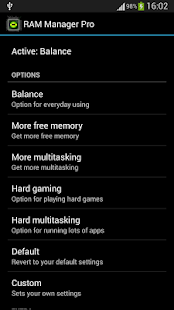
★Balance – Option which makes your RAM to the best optimization, this option is for everyday use. Use this option when you want to have fast phone without lags.

★More free memory – This option is nearly the same as Balance, but this option should be advantageous for users who have more RAM than 512 MB. This option gives you more free memory but a bit reduces multitasking.

★More multitasking – This option is nearly the same as Balance, but this option should be advantageous for users who have less RAM than 512 MB. This option gives you more multitasking, but a bit reduces free memory.

★Hard gaming – Option which stabilizes your RAM for playing hardest games. Use this option for games which lag on your phone. Your games will run smooth without lags.

★Hard multitasking – Option for users which are really hard working on their phones. You can have a lot of running apps and quickly switch between them without lags.

★Default – This option reverts your RAM to your default settings, which you had before you installed this app.

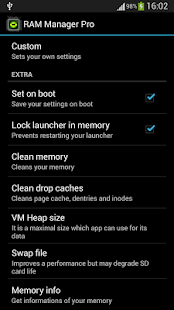
★Custom – This option allows you to set your own settings.

★Set on boot – Saves all your settings on boot.

★Lock launcher in memory – Prevents restarting your launcher.

★Clean memory – Cleans your memory.

★Clean drop caches – Cleans page cache, dentries and inodes.

★VM Heap size – It is a maximal size in MB which application can use for its data.

★Swap file – Improves performance but may degrade your SD card life.

★Memory info – Shows information of your memory.

★Memory graph – Shows your free and used memory.

★Widget (Light or dark theme)

★You can switch between all options without rebooting

★Languages – English, Czech, Slovak, Korean, Italian, Croatian, Polish, French, Russian, Greek, Chinese, Turkish, Spanish

PLEASE NOTE!

If you want be really sure that this application works, I recommend to not use any other scripts or applications related to memory management.

Download via Google Play:

RAM Manager Pro 6.0.2 on Google Play

Download :

http://uploadsat.com/gsa9qcg4g2sc.html

http://www.kingfiles.net/4gk2bbnsz42..._Pro_6_0_2.apk

http://unlimitzone.com/3o0m8jckmn7n/...6_0_2.apk.html

http://hulkload.com/q7go007zh1pc


RAM Manager Pro v6.0.2 apk

Rom Manager Premium v5.5.3.3 apk

ROM Manager Premium v5.5.3.3

Requirements: Android v2.2+

Overview: Must have app for any root user. Make backups, flash ROMs, and own your device.

ROM Manager is THE MUST HAVE APP for any Android root user. (Over 3 million downloads and counting!)

About ROM Manager

ROM Manager is THE MUST HAVE APP for any Android root user. (Over 10 million downloads and counting!)

* Flash your recovery to the latest and greatest ClockworkMod recovery.

* Manage your ROMs via a handy UI.

* Organize and perform backups and restores from within Android!

* Install ROMs from your SD card.

* Install your favorite ROMs over the air!

Premium Version:

* Incremental update zips (save your data plan!)

* Premium ROMs

* Receive notifications for when your ROM is updated!

* Automatic backups

* Install Queue

* Web Connect

* Backup Download Server lets you easily transfer backups as flashable zips to your computer.

Do you prefer using only recovery manually? Check out the Touch Recovery in app purchase, for the most advanced recovery available!

Why does ROM Manager ask for account permissions?

Web Connect only needs to access your Google account to connect it to your google account. It can't access any private data or passwords.

ClockworkMod Touch Recovery:

ClockworkMod Touch recovery (and recovery) is work that needs to put in for every new device that is released by a manufacturer.

If work on ROM Manager ceased completely, all the premium features would continue working without issue. However, new recoveries do not port and build themselves. Without ClockworkMod Touch being a per device purchase, there is no way to recoup recurring server costs and labor. Keeping ROM Manager free and operational costs tens of thousands of dollars a year, and that does not include engineering costs.

Your support is appreciated.

Troubleshooting:

Droid users: Stuck at the "M" logo? Flash an alternate recovery and flash back to ClockworkMod.

HTC Users: Flash recovery not working? Try fastbooting a recovery on.

Droid X/2/Pro Users: You must run the Bootstrap application first to use ROM Manager.

Samsung users: You must flash a Clockwork compatible kernel first (see XDA forums)

IF YOU ARE HAVING LICENSE ISSUES, MAKE SURE YOU HAVE THE LATEST VERSION OF FREE (4.0+) AND THE LATEST LICENSE (1.0.8+) INSTALLED!

Recent changes:

1.0.8: Fixup premium detection on tablets.

Visit Website

Less description »

This app has NO advertisements

If your ROM came with ROM Manager you'll have to remove it before installing this.

More Info:

https://play.google.com/store/apps/d...tta.rommanager

Download Instructions: Premium features Unlocked

http://www.tusfiles.net/ywb09w88wsa6


Rom Manager Premium v5.5.3.3 apk

ASTRO File Manager with Clouds Pro v4.4.576 apk

ASTRO File Manager with Clouds Pro v4.4.576

Requirements: Android 2.2+

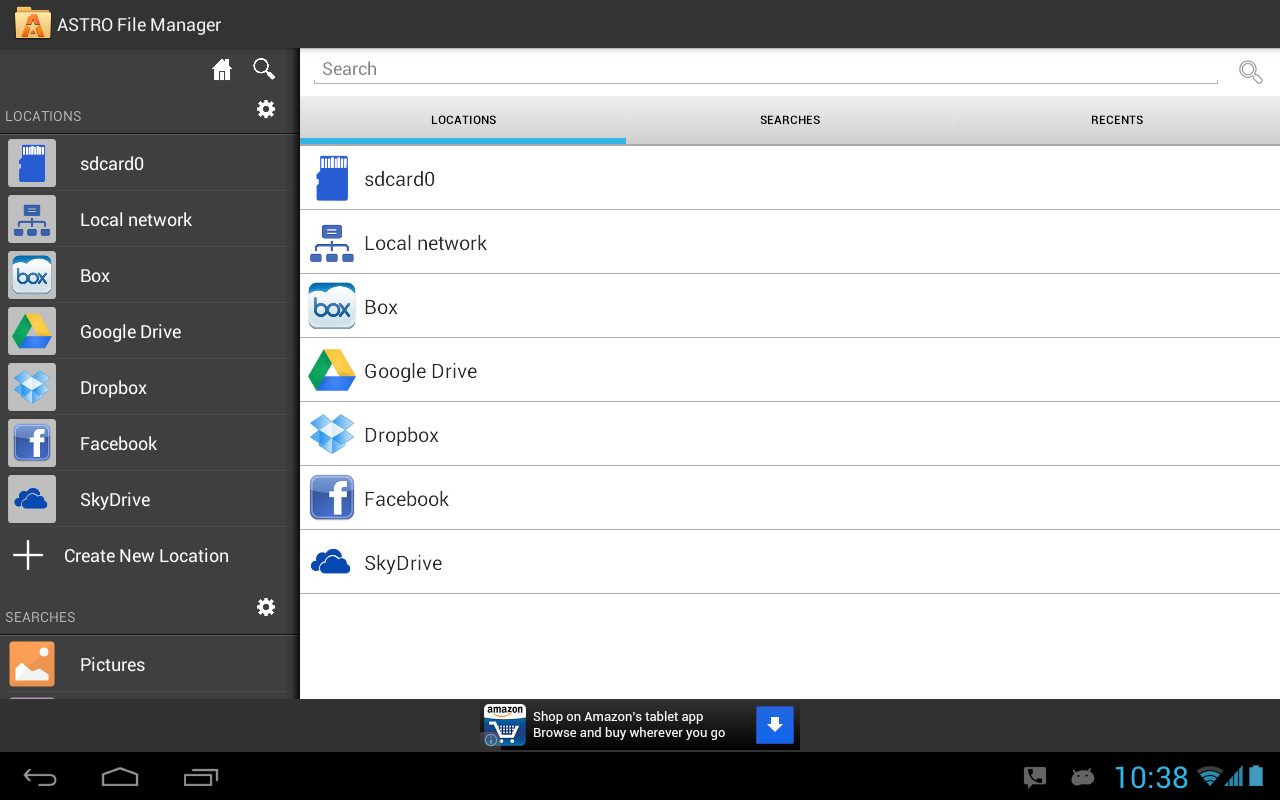
Overview: ASTRO Cloud & File Manager has over 70 million downloads worldwide! Organize, view and retrieve all of your pictures, music, videos, documents or other files regardless of where they are located:

* Phone * Tablet * Clouds (Facebook, Dropbox, Google Drive, Box or SkyDrive) * PC, Mac, Linux (via built in networking)

Click here to ask to join our Beta Test Google + Group: http://plus.google.com/b/10309521602...76630475861309

Ever try to find a file but can't remember where you put it? ASTRO has the most robust SEARCH technology in the mobile world, giving you the ability to do anything from broad searches across all locations mentioned above for types of content (pics, music, videos, etc.) to very specific searches based on file name, size, location, etc. And, with ASTRO's unique "CLOUD HOPPING (TM)", you can move files from one cloud to another in a single copy or move/paste - without having to download them first before sending to your destination cloud!

ASTRO now has support for Leef Bridge, a powerful, yet simple, innovative USB flash drive that allows users to easily transfer files to other devices (Android phones, tablets, Macs and PCs) without the need for cables, cloud services, Wi-Fi or any type of data connection. Leef Bridge features a micro USB connector and full-size USB connector that access the same memory so users can share content, photos, videos, music and documents to and from any compatible device. Visit http://www.2leef.com/bridge for more information and a list of compatible devices.

What are some of the benefits to ASTRO’s new Indexing functionality:

- After your first search, results are almost instantaneous across all indexed locations (mobile device, clouds, networked locations)

- If you are offline, you can still search for files that have been indexed.

- Eliminates redundant network calls in ASTRO, making some operations faster.

- Better file browsing experience in areas with spotty or slow network coverage.

How does ASTRO’s new Indexing functionality work?

- As you browse through directories on your device, clouds or networked locations, ASTRO begins indexing your files in the background in order to speed up future searches you perform.

- It will also build your index whenever you do a search. It will build the index for your internal and external sd cards very quickly (typically under 15-20 seconds). Clouds or networked locations will take longer and also depends on the number of files in those locations.

- You can also choose to proactively index any of your other locations like clouds (Box, Dropbox, Google Drive, SkyDrive) and networked locations by doing a search on those locations or by going to Settings, Search index and click Rebuild index. Keep in mind if you choose to index a 500GB server you have at home, it may take a while. :)

- You can go to Settings, Set Default Search Locations to set your default locations.

- You can go to Settings, Search index and clear your index at any time as well.

- SWIPE SCREEN RIGHT to get to Clouds, Network Locations or Saved Searches fast

- SWIPE SCREEN LEFT to get to Tools (App Backup, Task Killer, SD Card Usage), Settings and Help

It gives you the ability to stop processes that burn battery life (Task Killer) and backup your apps (App Backup) in case you lose or change phones.

Features include: file management, content management, multi-cloud, cloud content management with Facebook, Google Drive, Dropbox, Box and SkyDrive, android file browser, file and/or app backup, image and text viewers, networking, Bluetooth, SFTP, Zip, downloader, thumbnails, search files, application manager, task manager, attachments...

Quick Start Guide, FAQ's and Documentation: http://support.metago.net.

ASTRO supports 11 languages including: English, French, Spanish, Italian, German, Japanese, Korean, Traditional Chinese, Simplified Chinese, Russian & Portuguese.

What's New

4.4.564

- Support for x86 devices

- updated to new Box API

This app has NO advertisements

More Info:

Code:


https://play.google.com/store/apps/details?id=com.metago.astro


Download Instructions:

http://www.kingfiles.net/nnbzpgtfbw6....4.576.apk.zip

Mirror:

http://ul.to/i8ju451j

http://unlimitzone.com/dgxnutvzendb/...6.apk.zip.html

http://www.tusfiles.net/gkaybikxpuul


ASTRO File Manager with Clouds Pro v4.4.576 apk

ASTRO File Manager with Clouds PRO v4.4.574 Android apk

ASTRO File Manager with Clouds PRO v4.4.574

Requirements: Varies with device

Overview: ASTRO File Manager has over 13 million downloads on the Android Market and allows you to easily manage all of your files on your phone or tablet. Pictures, music, documents, videos... ASTRO is in most Top Ten Android App lists and has been recommended in books like Amazing Android Apps. DOWNLOAD NOW and join the ASTRO family.

ASTRO File Manager has over 45 million downloads on the Android Market and 350,000 reviews!

Organize and manage your files and content such as pictures, music, videos or documents on your phone, tablet, PC (via networking) or on cloud services like Facebook Photo Albums, Dropbox, Google Drive, SkyDrive or Box. It's like Windows Explorer or Mac’s Finder with connections to the most popular clouds.

ASTRO now has support for Leef Bridge, a powerful, yet simple, innovative USB flash drive that allows users to easily transfer files to other devices (Android phones, tablets, Macs and PCs) without the need for cables, cloud services, Wi-Fi or any type of data connection. Leef Bridge features a micro USB connector and full-size USB connector that access the same memory so users can share content, photos, videos, music and documents to and from any compatible device. Visit Product for more information and a list of compatible devices.

It’s picture view works better than standard galleries and ASTRO is in dozens of Top Ten Android App lists and has been recommended in books. DOWNLOAD NOW.

RECENT CHANGES:

** Click "My Files" for file management (copy/move/delete/etc) **

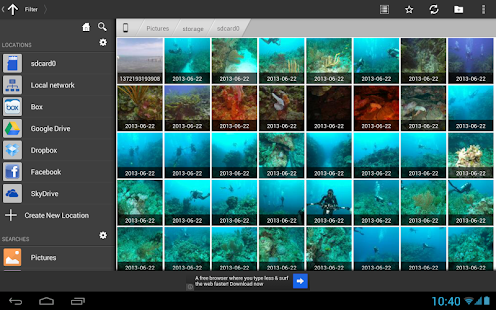
* NEW: New Picture Gallery

* NEW: Image Viewer enhancements including rotate picture

* SkyDrive, Google Drive, Dropbox, Box & Facebook integration

- SWIPE SCREEN RIGHT to get to Clouds, Network Locations or Saved Searches fast

- SWIPE SCREEN LEFT to get to Tools (App Backup, Task Killer, SD Card Usage), Settings and Help

It also gives you the ability to stop processes that burn battery life and backup your apps in case you lose or change phones.

Features include: file management, cloud storage with Facebook, Google Drive, Dropbox, Box and SkyDrive, android file browser, file and/or app backup, image and text viewers, networking, Bluetooth, SFTP, Zip/ Tar, downloader, thumbnails, search files, application manager, task manager, attachments and more…

Please visit our new support portal for a Quick Start Guide, FAQ's and Documentation. http://support.metago.net.

Screen Searches tab

ASTRO currently supports 11 languages including: English, French, Spanish, Italian, German, Japanese, Korean, Traditional Chinese, Simplified Chinese, Russian & Portuguese.

Recent changes:

4.4.564

- Support for x86 devices

- updated to new Box API

4.4-543 - fixed several small bugs on several different platforms

4.4-541

- Improved memory usage

- Improved Skydrive support

4.4-528

- Indexed Searches. Search are now automatically indexed which greatly decreases search times for clouds and networks. Read more about how indexing works in the Description.

Visit Website

Less description »

Note: all premium features available. no need key file.

PRO features Unlocked

This app has NO advertisements

More Info:

https://play.google.com/store/apps/d...m.metago.astro

Download:

http://ul.to/l3eghno2

http://rapidgator.net/file/f09766fd4...954a3f49dd97a/


ASTRO File Manager with Clouds PRO v4.4.574 Android apk